
How To Productise Your Services with Assembly’s Client Portal
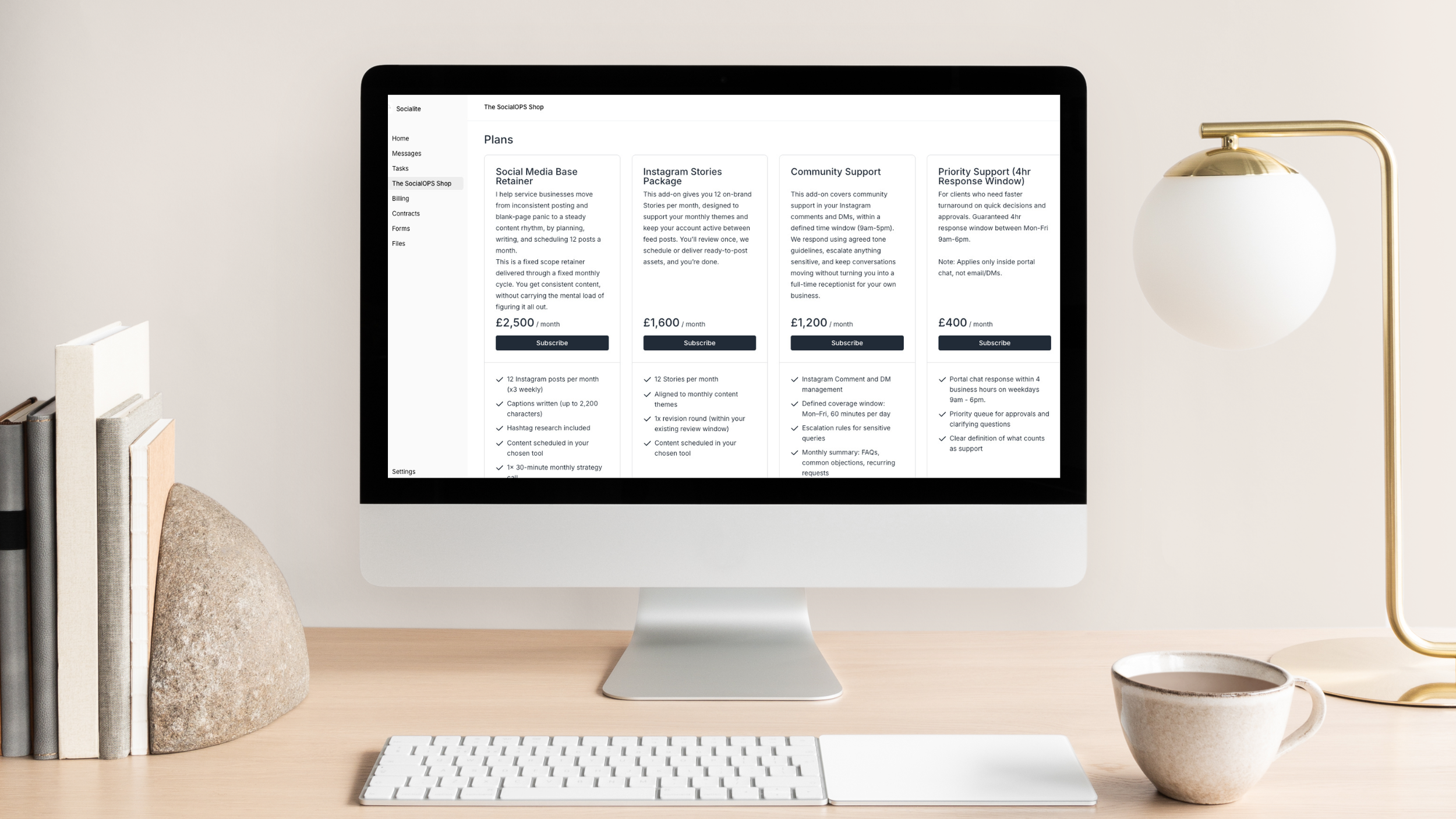
Selling your productised offers through Assembly.
If you have ever closed your laptop on a Friday knowing your calendar was stacked but your client work barely moved, you are not alone. Most service providers hit a point where the admin, the back-and-forth, the "quick question" that spawns a 40-minute call, and the constant re-scoping start to weigh more than the work itself. Your mind feels like endless browser tabs it cannot close.
In this article, I will walk you through exactly how to productise your services using a framework I call SCOPE. You will learn the five decisions that define a clear, repeatable offer, how to set boundaries that protect your time without pushing clients away, and how to deliver everything through a single client portal so nothing falls through the cracks.
Key takeaways
Most service providers are not tired from the work itself. They are drained by the constant renegotiation around it. Productising creates a container for client delivery that protects your time and energy.
A productised service is a fixed scope of work, delivered through a fixed process, for a fixed price. It is not a cookie-cutter system or a marketing costume for your existing offer.
The SCOPE framework gives you five upfront decisions that define your entire offer: Service transformation, Clarify deliverables, Operational roadmap, Pricing and terms, and Extensions.
Your transformational promise is your boundary. Anything that sits outside of it does not automatically get included. It becomes a productised add-on.
Support included is where retainers quietly double in size. Define where support happens, when you are available, how fast you respond, and what counts before you begin.
Your delivery tool either reinforces your boundaries or quietly dissolves them. Choose one space where clients can access everything, see progress, and get support.
Productising is not about doing less for clients. It is about doing less of the invisible work that drains you and more of the work that actually matters.
The real cost of selling availability
Most service providers are not selling hours. They are selling availability. The kind that leaks into the cracks of your day.
A question that does not need a meeting but somehow steals one. The revision that arrives as a casual afterthought but drags the whole project back onto your desk. With custom work, project scope has a way of quietly growing teeth between proposal and delivery.
Yes, you are charging for some of it. But your calendar suggests the rest is being chewed up in fragments. By the end of the week, you are not tired from the work itself. It is the constant renegotiation around the work.
If your business relies on you constantly repeating boundaries, you do not need better discipline or time management. You need a container for client delivery.
Productising your services can offer that container.
What productising your services actually means
When people hear the phrase "productising your services," they often think of generic, cookie-cutter, copy-and-paste systems. This is not that.
Other times, they picture pricing tiers and shiny package names. But productising is not about adding a marketing costume to your work.
A productised service is a fixed scope of work, delivered through a fixed process, for a fixed price.
It clearly defines the parameters around the work itself, your deliverables, the people it serves, the process behind it, and the outcome it creates.
Think of it as operational clarity packaged into a promise. Or that space in your calendar you have been searching for.
Why productising works for service-based businesses
Productising gives you back your mental bandwidth. Two things shift when you move from custom proposals to a defined offer.
First, your delivery becomes repeatable. You follow a proven process instead of inventing one each time, which means smoother client experiences, easier sales conversations (because you are not reinventing your offer on every call), and the ability to actually delegate work because a fixed process is far easier to hand off than a custom one.
Second, your revenue becomes predictable. Fixed pricing means you know what is coming in each month. You stop trading time for guesswork and start building something sustainable.
The S.C.O.P.E Framework
To build your productised service, I use a framework called SCOPE. Each letter represents one decision you make upfront so you can stop making them under pressure later.
To bring this to life, I will walk through each decision using a social media marketer as an example, but this applies to any service-based business.
S: Service transformation
Decision one: define your client's transformation.
Before you talk deliverables, you need to know exactly what you are selling. Ask yourself:
Who is this for?
What are they struggling with?
What changes after you are done working together?
That is your transformational promise, written as a single sentence.
I want you to name this in two layers:
What changes in their business?
What changes in them?
The practical outcome is what gets someone's attention. But it is the emotional shift that makes them commit.
Example
I help service businesses move from inconsistent posting and blank page panic to a steady content rhythm by planning, writing, and scheduling 12 posts a month.
Notice the difference. The promise is not "I post content for you." The promise is: you get to show up consistently without the mental load of figuring it all out. That is what they are buying. Consistency, direction, and one less task pulling at them.
Your Turn
I help [target audience] move from [current state] to [desired outcome] through [method].
Once you have this sentence, keep it visible. It becomes your boundary. If something sits outside of this work, it does not automatically get included in the offer. Instead, it becomes a productised add-on.
C: Clarify deliverables
Decision two: define exactly what the client receives.
Now we are getting into specifics. When thinking about what to include, ask yourself: what line items would I add onto an invoice?
Be clear. Vague deliverables create vague expectations, and vague expectations create scope creep.
Include exactly what the client will receive, your communication touch points and support, revisions included, and how the delivery process works.
Example deliverables for a social media retainer:
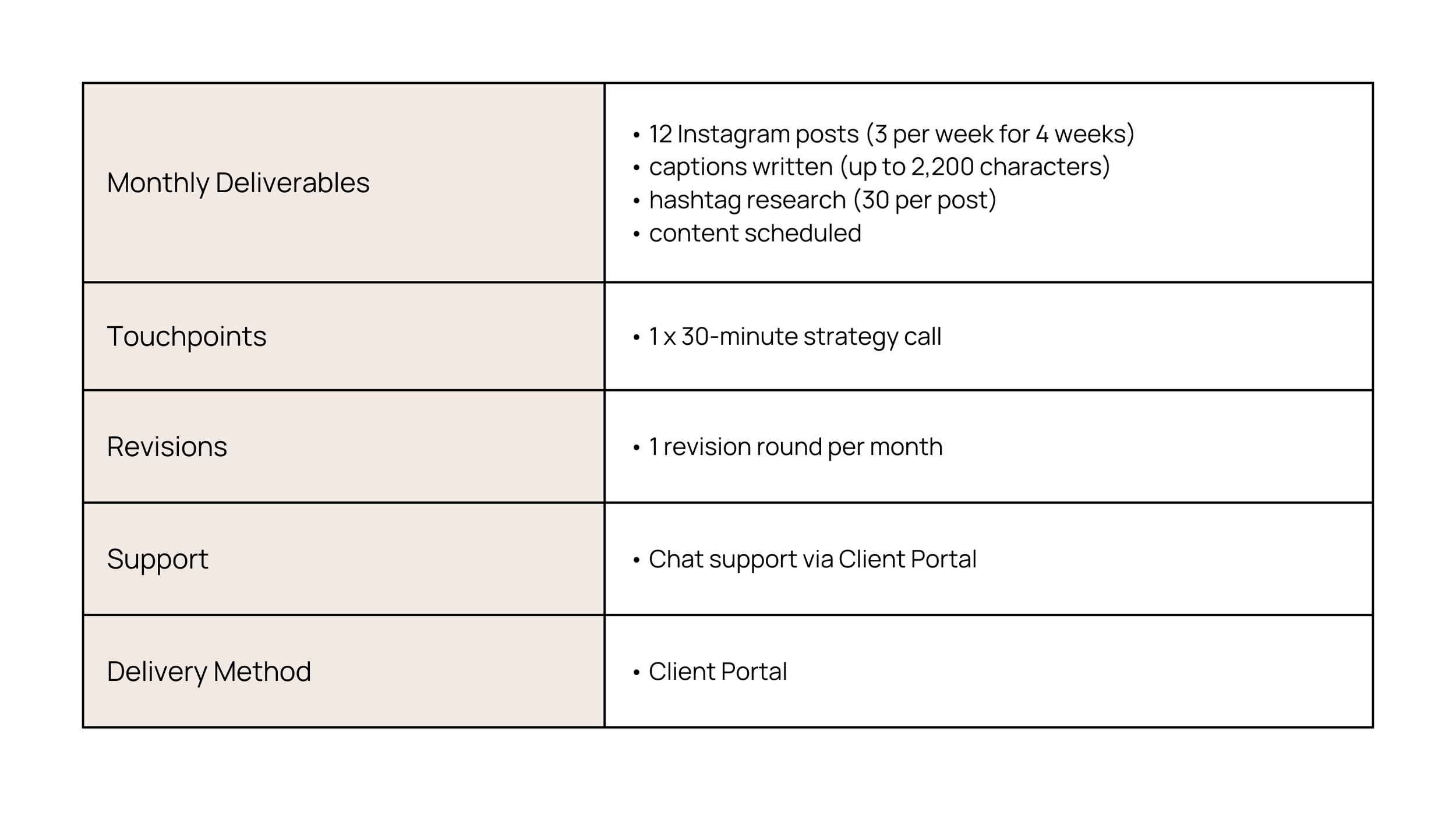
Example deliverables included in a productised service.
O: Operational roadmap
Decision three: build a roadmap the client can follow without you narrating it.
Ask yourself: what does this delivery process look like from closing the client to completing the project?
Your productised service can be a one-off project or an ongoing retainer:
If it is a project, your roadmap has stages the client moves through once.
If it is a retainer, your roadmap is a cycle that repeats.
Either way, the goal is the same. The client has a clear path to follow that is visible at all times, and you get to stop re-briefing yourself throughout the project.
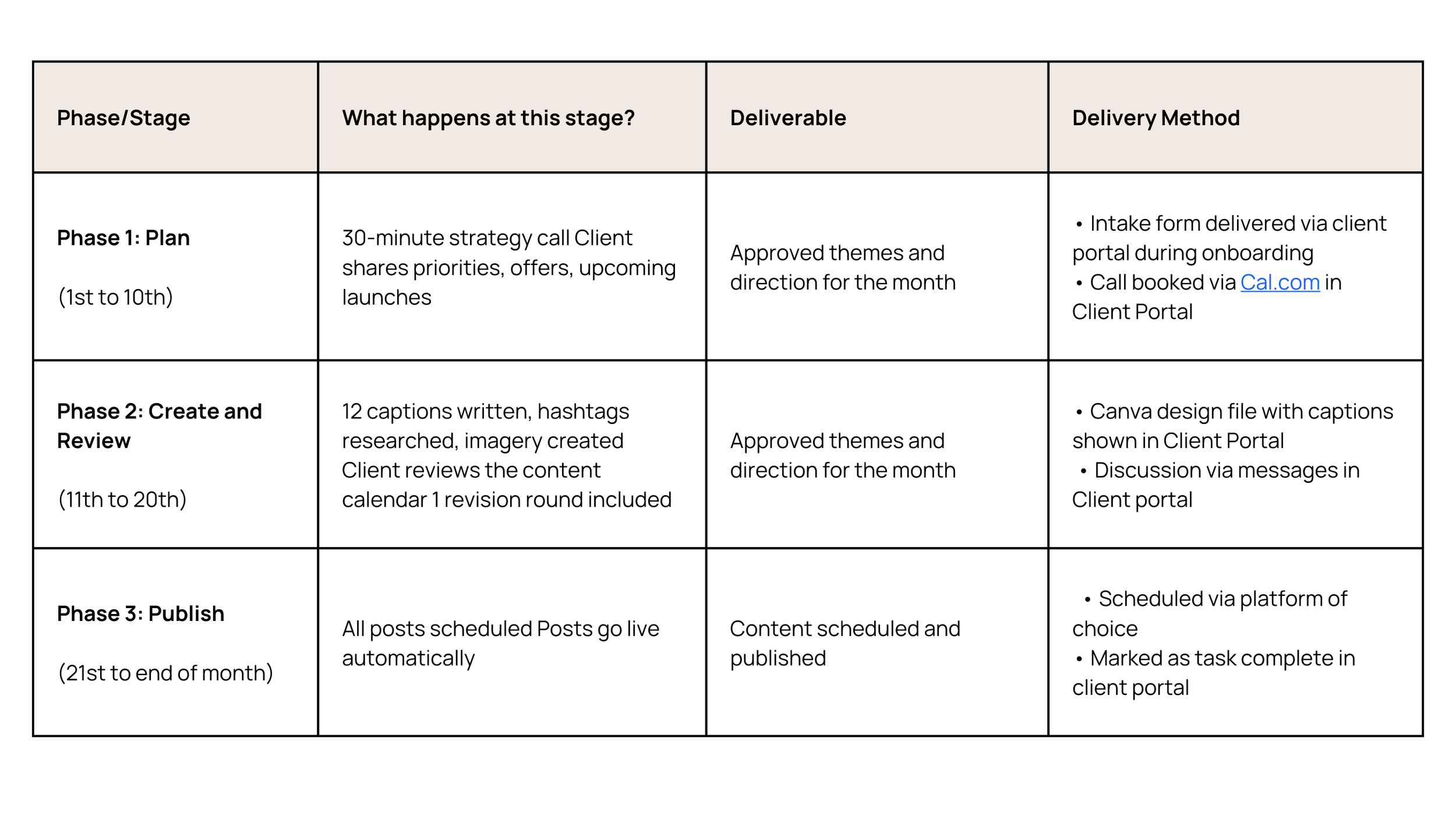
Example process in a productised service.
P: Pricing and terms
Decision four: set the terms that stop you leaking capacity, time, and energy.
This includes pricing, payment rhythm, your cancellation policy, required client inputs, what is included, what is not included, and your support boundaries.
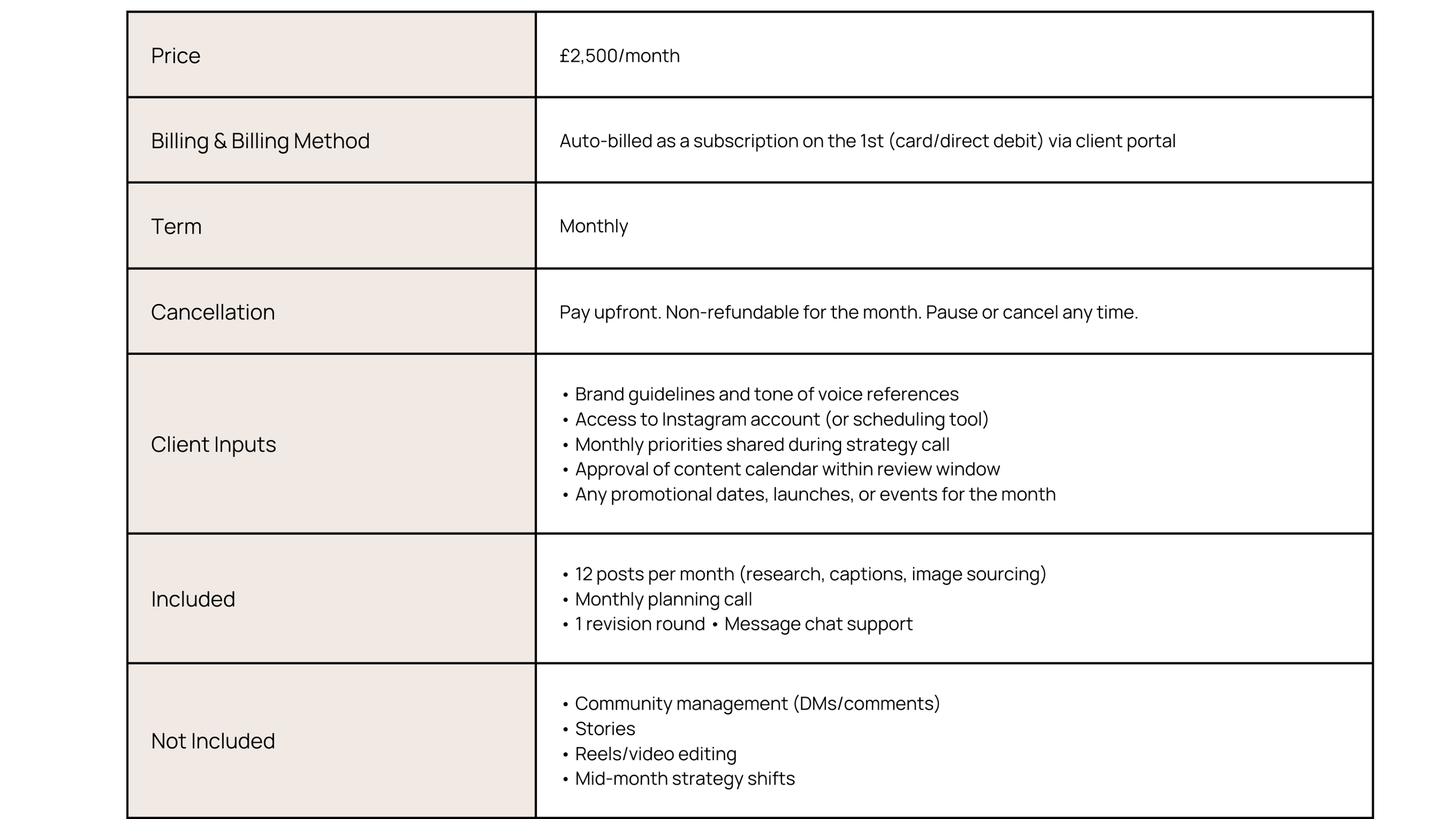
Example pricing and terms in a productised service.
What the client needs to provide:
Brand guidelines and a tone of voice reference
Access to their Instagram account and/or preferred scheduling tool
Monthly priorities communicated during the strategy call
Content calendar approval within the set review window
Key promotional dates, launches, or events to plan for
What is not included:
Community management
Stories, video reels
Mid-month strategy shifts
Being as clear as possible here matters. If it is not listed, it is not included.
Define your support boundaries upfront
Support is where retainers quietly double in size. Decide clearly before you start working together:
Where does support happen? Choose one channel (for example, chat in the client portal).
When are you available? Set a specific window (for example, Monday to Friday, 9am to 5pm).
How fast do you respond? Set a response time (for example, within 24 hours).
What counts as support? Define what is included (for example, quick questions about scheduled content) and what is not (for example, new strategy requests).
What happens when a client asks for more? Point them to your productised add-ons.
I would typically add this information as a home tab within the client portal so it is easily accessible. You could also discuss it during the sales process or include it in a welcome pack.
The point is that everyone is crystal clear and knows what is happening at all times. That predictability creates trust.
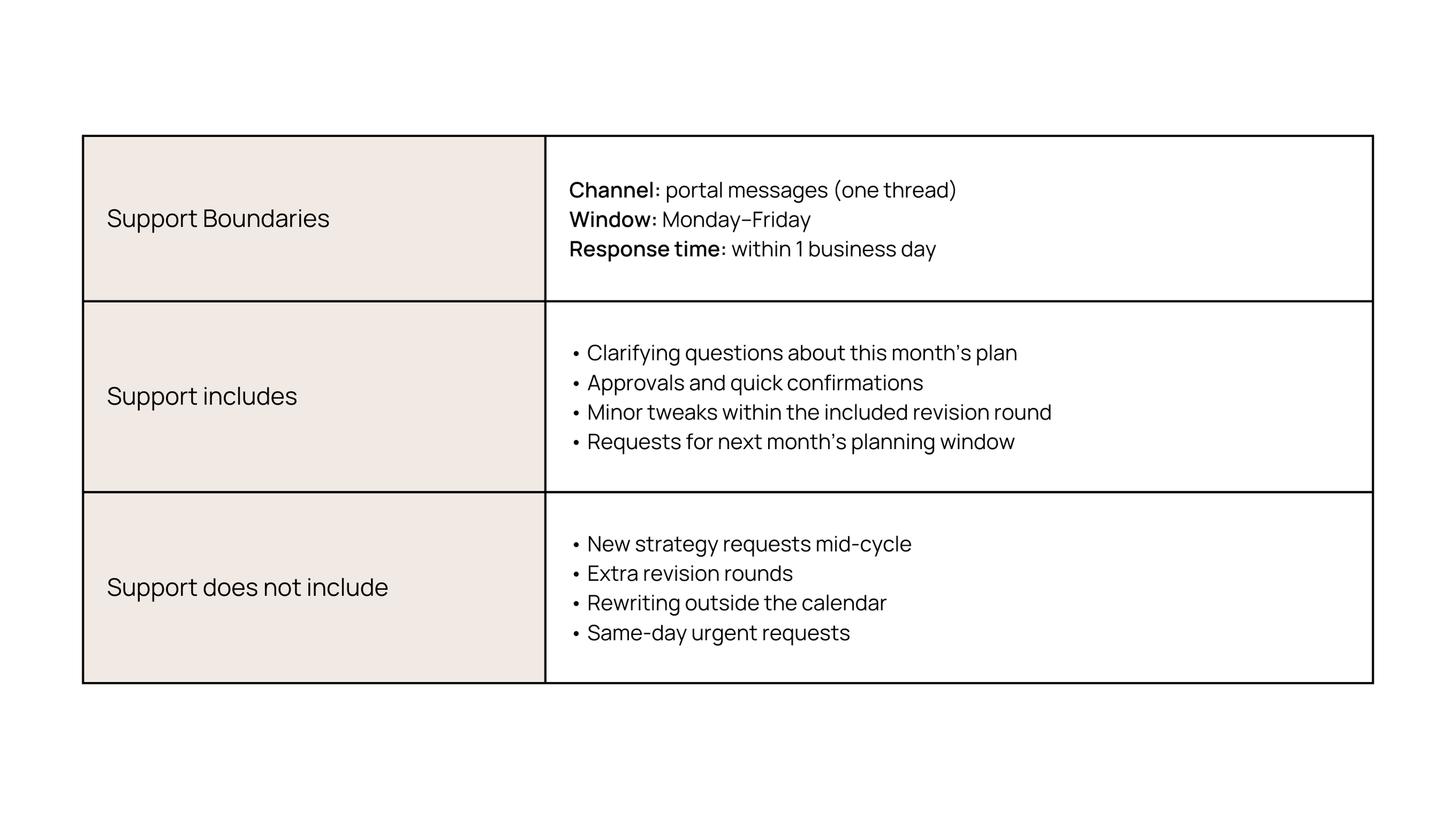
Example support boundaries in a productised service.
E: Extensions
Decision five: create add-ons so you never have to renegotiate on the spot.
Every time a client asks "can we just change this?" or "can you add that?", you want a simple choice ready for them.
Ask yourself: what little extras do clients ask for outside your main offer?
If it comes up often, you do not renegotiate it. You productise it. Make it an add-on with a fixed scope, fixed price, and fixed terms.
Example add-ons for a social media retainer:
Instagram Stories package
Community management
Monthly analytics report
Priority support
The beauty of this approach is flexibility without emotional negotiation. It is simple, it is clear, and it does not require any additional thought on your part.
Write down the common requests you receive outside of your core offer. Those are your first extensions.
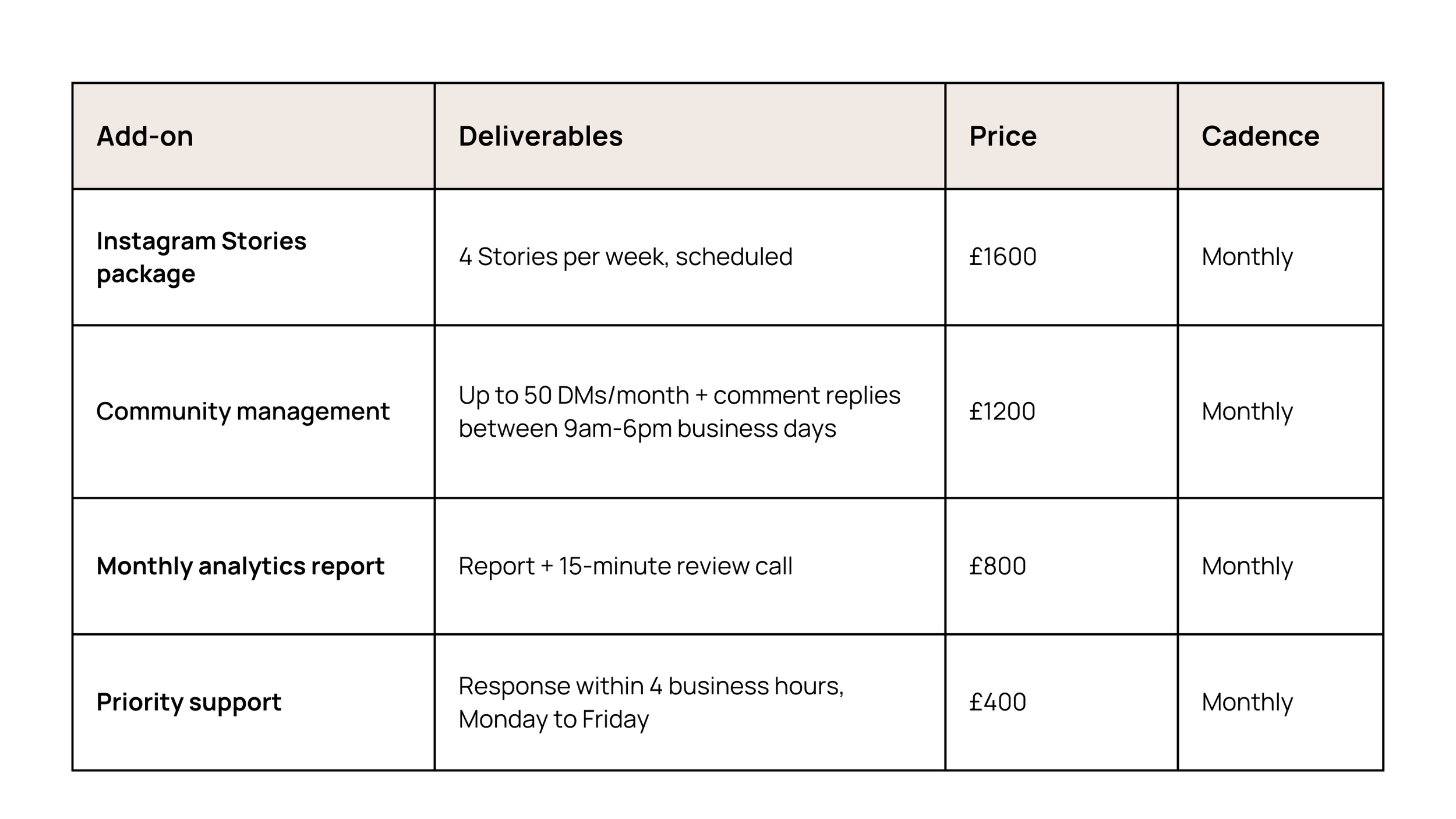
Example add-ons in a productised service.
Putting SCOPE together
Here is a quick recap of the five decisions:
S - Service transformation - What changes for the client?
C - Clarify deliverables - What will they receive?
O - Operational roadmap - How does it get delivered?
P - Pricing and terms - What does it cost and what are the terms?
E - Extensions - What happens when the client asks for more?
That is your SCOPE. That is your productised offer. But we are not quite done.
Delivering your productised offer
Delivery has to match the level of clarity you just built. Otherwise, you are still going back and forth through email.
Think of it in two steps:
Build your offer (everything we covered above with SCOPE).
Deliver your offer through a single space where clients can access everything.
Your clients need one place where they can see what is happening at any given point, access their deliverables, and get support when they need it.
This is where your tech stack either reinforces your boundaries or quietly dissolves them.
Whatever tool you choose, make it:
Easy to find
Easy to navigate
Structured so the work is always visible at a glance
There is no single rule book here. It is important to find the structure and the tools that work best for you.
Setting up your productised service in Assembly
Everything above stands on its own regardless of what tools you use. But if you want to see how this looks in practice, here is how I would set it up using Assembly, the client portal I personally use and recommend.
Assembly supports you throughout the entire client lifecycle, and it makes productising your services simpler because all of the functionality is built in.
Step 1: Create your services
Log into your Assembly account and click Billing in the sidebar.
Click the Services tab along the top.
Click Create Service.
Add your service name.
Write a description. This is a great place to include your transformational promise alongside everything in your offer.
Add an image.
Scroll down and add your pricing information. On the right, choose between one-time or recurring. For a monthly retainer, select Monthly as your billing period.
Click Create Service in the top right corner.
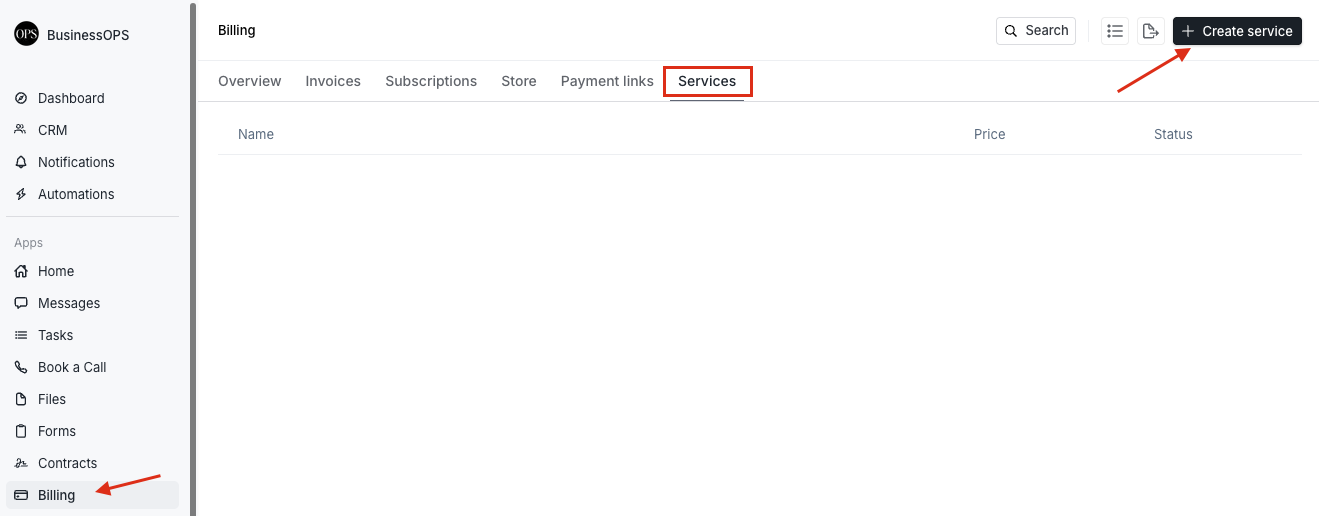
Set up each productised service as a structured, repeatable offering inside Assembly.

Define your service clearly with scope, pricing, and positioning before making it available to clients.
Repeat this process for each of your add-ons. For example, you might end up with your core social media retainer plus an Instagram Stories package, a community management package, and a priority support package.

List of active services in Assembly showing pricing and status for each productised offer.
Now, when a client wants more, you do not need to stop and send a custom quote mid-month. They can select their add-on and pay directly from their portal.
Step 2: Build your storefront
Under Billing, click on Store.
Give your store a name.
Toggle on Ongoing plans if you offer recurring services.
Click in and select the retainer you want to add.
Use the Features section to list the deliverables for your productised service.
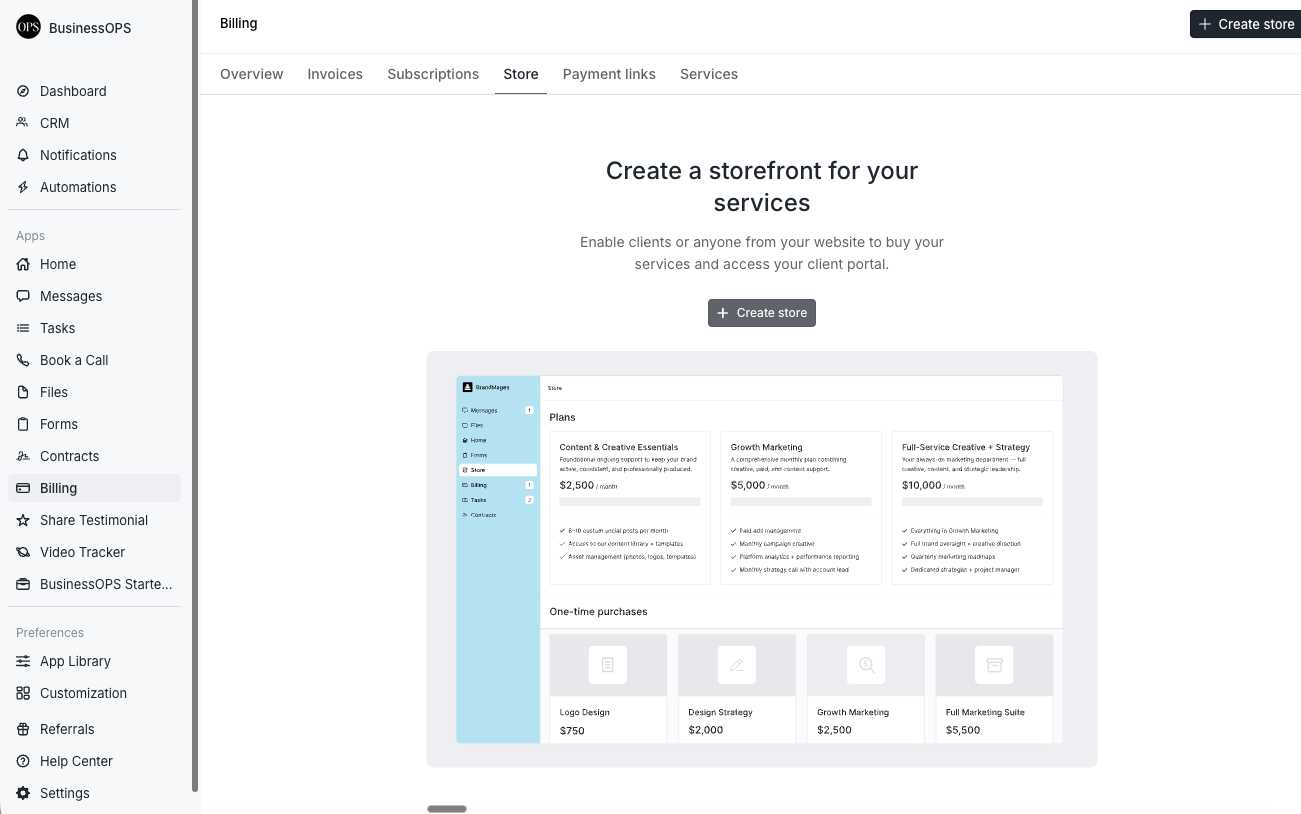
Bring your services together into a clean storefront where clients can browse and subscribe.
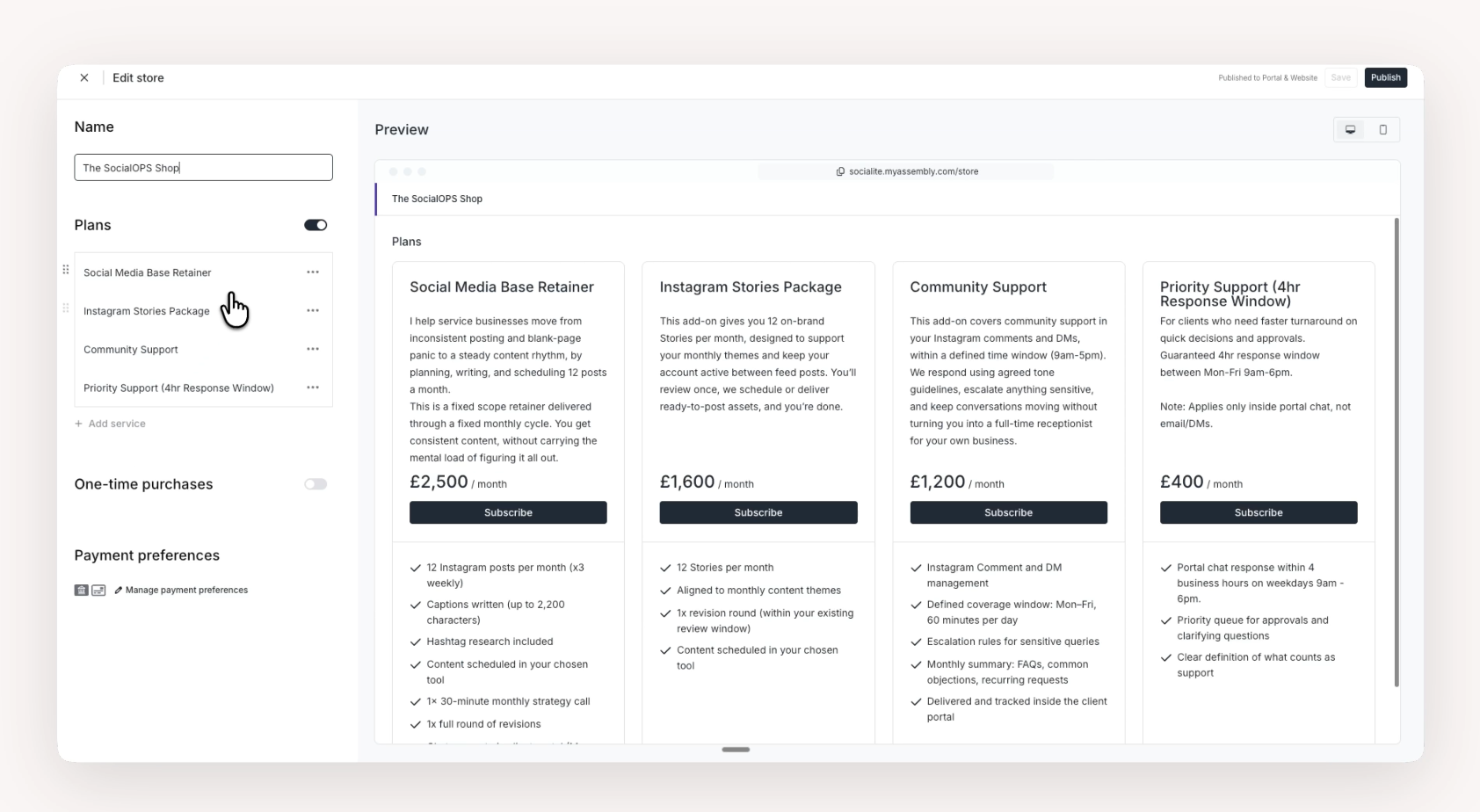
Start by creating your storefront, the central place where your productised services live.
Click Save, then add your add-ons following the same process.
If you have one-time purchases, toggle that on and select the relevant items. If not, leave it off. One-time purchases can be a great way to turn a low-ticket offer into a high-paying client.
Click Manage payment preferences. Attach a payout account, select how you will receive payments, and decide who covers the processing fee. Click Save.
Preview your store on the right, switching between desktop and mobile views.
When you are ready, click Publish in the top right corner.
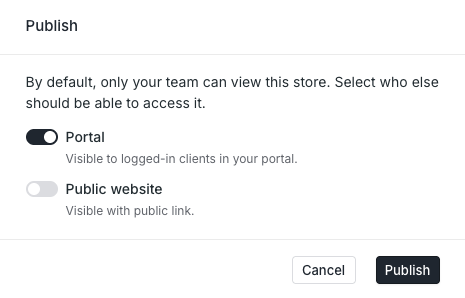
You can choose how to display your storefront:
Portal toggle: makes it visible in the sidebar of your client portal, so existing clients can purchase add-ons.
Public website toggle: generates a URL link you can add to your website navigation.
Step 3: Create payment links
If you have your website designed a specific way and want the flexibility to build your own sales pages, you can use payment links instead of linking directly to your storefront.
Go to Billing in the sidebar.
Click Create a payment link.
Choose the product you want to link to.
Click Create in the top right corner.
Copy the link.
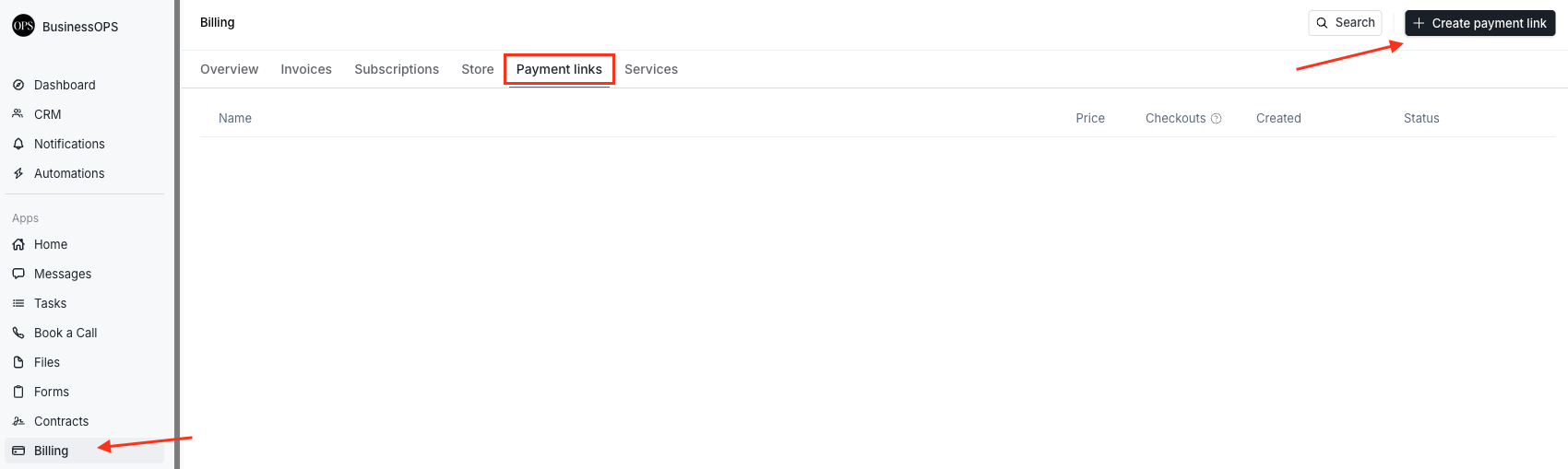
Create simple payment links directly inside your client portal to sell productised services.
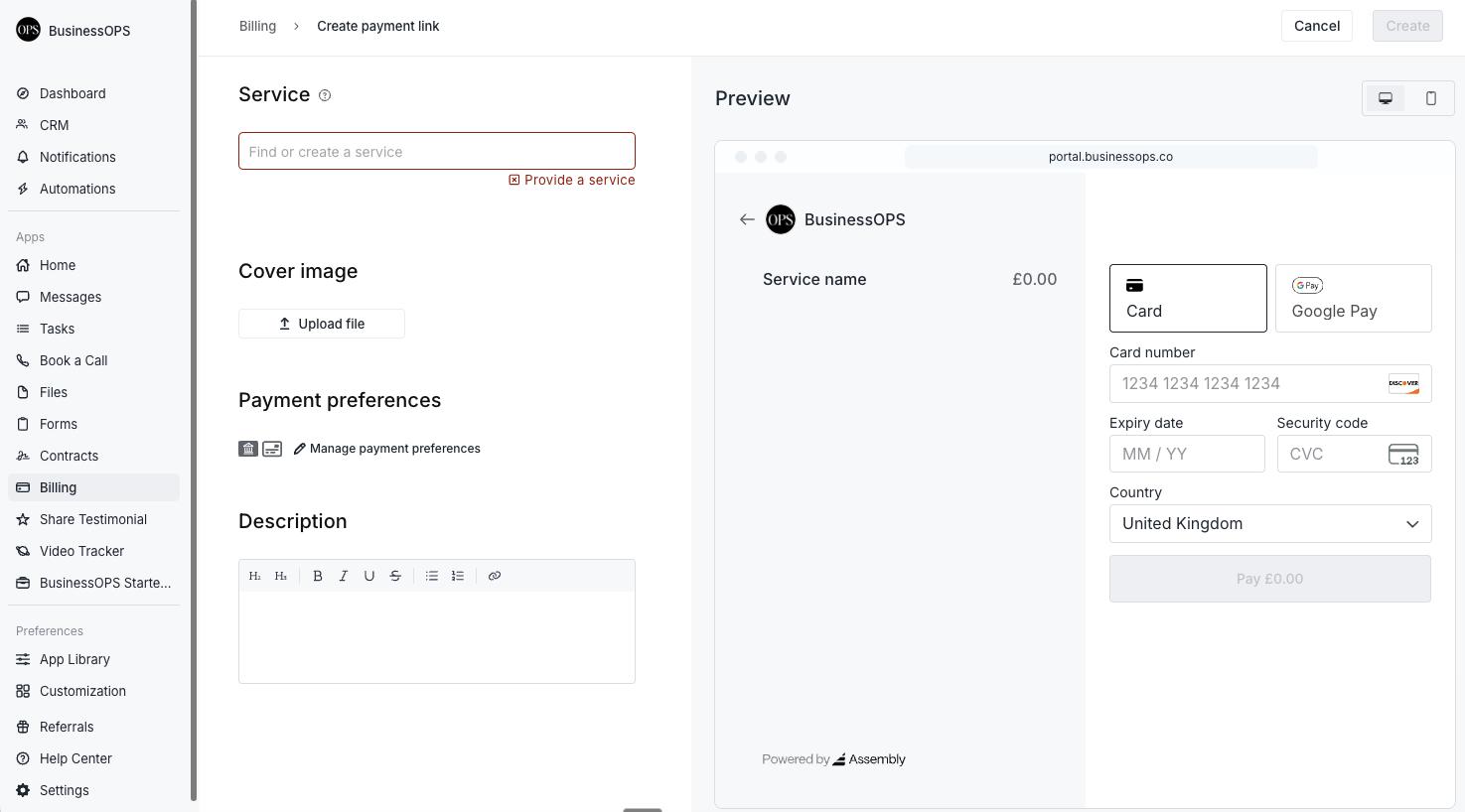
Attach your service to a payment link so clients can purchase without friction.
Drop this link anywhere: on a sales page as a "Buy Now" button, in an email, through LinkedIn, or through Instagram DMs. You have different front doors, but it is the same portal experience on the other side.

Share payment links directly with clients to move from conversation to conversion quickly.
When someone clicks the link and makes their payment, they are onboarded into their own client portal automatically.
Assembly offers a 14-day free trial, which is a perfect amount of time to get everything set up and test it. When you are ready to sign up for a plan, you can use the code CHLOE at checkout to get $100 off your purchase.
One last thing
Productising is not about shrinking your offer or becoming less flexible. It is about building a structure that holds the work so you do not have to hold it all in your head.
You got into this work because you are good at it. The goal is to stay good at it without it quietly consuming every corner of your week. SCOPE gives you a way to define the edges of your offer once, clearly, so you can get back to the part you actually love: the work itself.
If you try this framework, I would love to hear how it goes. You can find me on YouTube or leave a comment below. I am always curious to see how people make these ideas their own.
FAQS
-
No. Productising is not about creating a rigid, one-size-fits-all package. It is about defining a clear scope of work, a repeatable process, and a fixed price. You can still have different tiers based on varying outputs, and your extensions give clients the flexibility to add what they need.
-
Start with the part of your work that repeats most often. Nearly every service provider has a core delivery process that follows a similar pattern from client to client. That is your starting point. The truly custom elements can become add-ons or a separate, higher-tier offer.
-
This is exactly what the Extensions step in SCOPE is for. If a request comes up regularly, productise it as an add-on with a fixed scope, fixed price, and fixed terms. If it is a one-off request that does not fit your offer, you can politely refer back to your transformational promise and explain that it falls outside the current engagement.
-
Both. If your offer is a project, your operational roadmap has stages the client moves through once. If it is a retainer, your roadmap is a cycle that repeats. The SCOPE framework works for either model.
-
Packages often focus on marketing: naming tiers, bundling features, and presenting options. Productising goes deeper. It defines the transformation, the deliverables, the delivery process, the terms, and the boundaries. It is operational clarity, not just a pricing structure.
